
Download Mr Captor – Free Screen Capture Tool for Windows, Mac, Android & iOS
Looking for a powerful, reliable screen capture software that works seamlessly across multiple platforms? Mr Captor is your go-to solution for capturing screenshots and recording screen videos with precision. Whether you're a student, content creator, developer, or professional designer, Mr Captor delivers high-quality captures with advanced features like scrolling page capture, video recording, delayed capture, and customizable interface options. This free screen capture tool supports Windows, Mac, Android, and iOS, making it one of the most versatile utilities available today. With regular updates and a secure, lightweight design, Mr Captor ensures smooth performance without compromising your system resources.
Advanced Screen Capture Features You Can’t Live Without
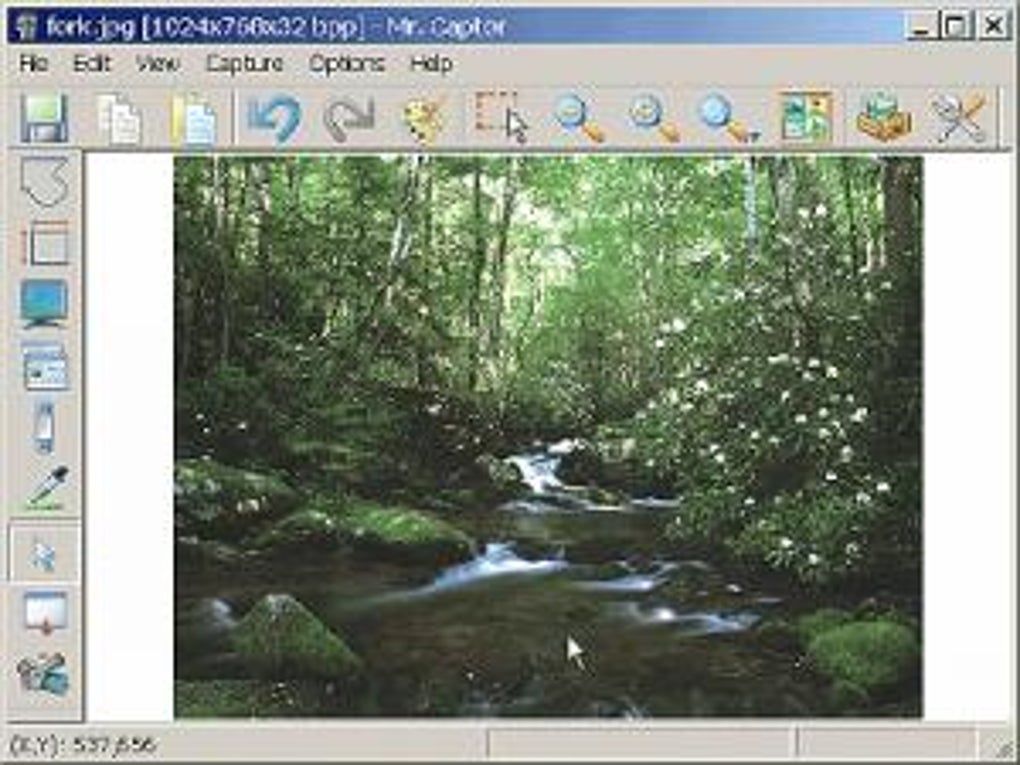
Mr Captor stands out in the crowded world of screen capture tools thanks to its robust and intelligent feature set. Unlike basic screenshot apps, Mr Captor goes beyond simple image capture by offering a full suite of tools designed for both casual users and professionals. One of the standout features is scrolling capture, which allows you to record entire web pages or long documents—perfect for saving research, tutorials, or lengthy social media threads without the need to manually stitch images together. This functionality alone makes Mr Captor a must-have for researchers, bloggers, and educators. Another powerful tool is video capture, introduced in version 2.0.0. With frame rate auto-adjustment, Mr Captor intelligently optimizes recording quality based on screen activity, ensuring smooth playback while minimizing file size. Whether you're recording gameplay, software demos, or online lectures, the video output remains clear and stable. The app also supports delayed capture, letting you set a countdown before taking a screenshot or starting a video—ideal for capturing pop-up menus or complex UI interactions. Additional features include color sampling, which helps designers and developers pick precise RGB values from any part of the screen, and image gallery functionality, allowing you to organize and manage all your captures in one place. The customizable interface lets you switch between small and large buttons, tailoring the workspace to your workflow. With support for full screen, window, and custom area capture, Mr Captor gives you complete control over what you record. All these features are packed into a lightweight, secure application that runs efficiently on modern systems.Easy Installation & Seamless Cross-Platform Usage
Getting started with Mr Captor is quick and hassle-free. The software is available for Windows, Mac, Android, and iOS, ensuring compatibility across nearly every device you might use. To download and install, simply visit the official website, choose your platform, and follow the straightforward installer prompts. The setup process takes less than a minute and requires no technical expertise. Once installed, Mr Captor runs in the background with minimal impact on system performance. For Windows and Mac users, the app integrates smoothly with your operating system. You can launch it via the system tray or use customizable hotkeys for instant access. On Android and iOS, the mobile version offers touch-friendly controls and real-time preview, making it ideal for capturing mobile app interfaces or sharing screen content on the go. The interface is intuitive—buttons are clearly labeled, and the layout adapts to your preferred size, whether you want a compact toolbar or a full-screen capture panel. Using Mr Captor is just as easy as it is powerful. To capture a screenshot, simply select your desired mode (full screen, window, or custom area), adjust settings like delay or file format, and hit the capture button. For video recording, start the session and let the app handle the rest—frame rate auto-adjustment ensures optimal quality. You can also access your saved captures through the built-in image gallery, where you can edit, rename, or export files directly. With regular updates and a strong focus on security, Mr Captor ensures your data stays protected during every session.Why Mr Captor Outshines Other Screen Capture Tools
While there are many screen capture apps on the market—such as oCam, FastStone Capture, and LightShot—Mr Captor brings a unique blend of power, flexibility, and user experience. Unlike LightShot, which is limited to basic screenshots and lacks video recording, Mr Captor offers full video capture with advanced settings. Compared to oCam, which can be overwhelming for beginners, Mr Captor maintains a clean, intuitive interface without sacrificing functionality. FastStone Capture is solid, but Mr Captor’s scrolling capture and color sampling tools give it a clear edge for design and documentation tasks. One of the biggest advantages of Mr Captor is its cross-platform consistency. Whether you're working on a Windows laptop, Mac desktop, Android tablet, or iPhone, the core features and interface remain familiar. This is invaluable for professionals who switch between devices throughout the day. Additionally, the app is regularly updated—recent versions have fixed bugs related to video corruption and image quality, proving the developer’s commitment to quality. Pros include:- High-quality scrolling and full-screen captures
- Video recording with auto frame rate adjustment
- Delayed capture and customizable hotkeys
- Color sampling and built-in image gallery
- Lightweight and secure performance
- Video recording currently doesn’t support audio capture
- Some advanced features require a paid upgrade (though core tools are free)
- Interface may feel too minimal for power users seeking deep customization
Frequently Asked Questions (FAQ)
Is Mr Captor free to download and use?
-
Yes, Mr Captor offers a free version with essential features like screenshot capture, scrolling capture, and basic video recording. While some advanced tools are available in a premium version, the core functionality is fully accessible at no cost.
Does Mr Captor support video recording with sound?
-
Currently, Mr Captor does not support audio recording during video capture. However, the developers have confirmed future updates may include this feature. For now, you can record screen activity with excellent visual quality and frame rate optimization.
Can I use Mr Captor on both Windows and Mac?
-
Absolutely. Mr Captor is fully compatible with both Windows and Mac operating systems. The app is optimized for each platform, ensuring smooth performance and consistent features across devices.
How do I access my captured screenshots and videos?
-
All your captures are stored in the built-in image gallery, which you can access directly from the app. You can browse, edit, rename, and export files in various formats like PNG, JPG, or MP4.
Is Mr Captor secure and safe to install?
-
Yes, Mr Captor is a secure software with no known malware or tracking components. It’s regularly updated to fix bugs and improve privacy, ensuring your captures remain private and your system stays protected.